
# Naming conventions
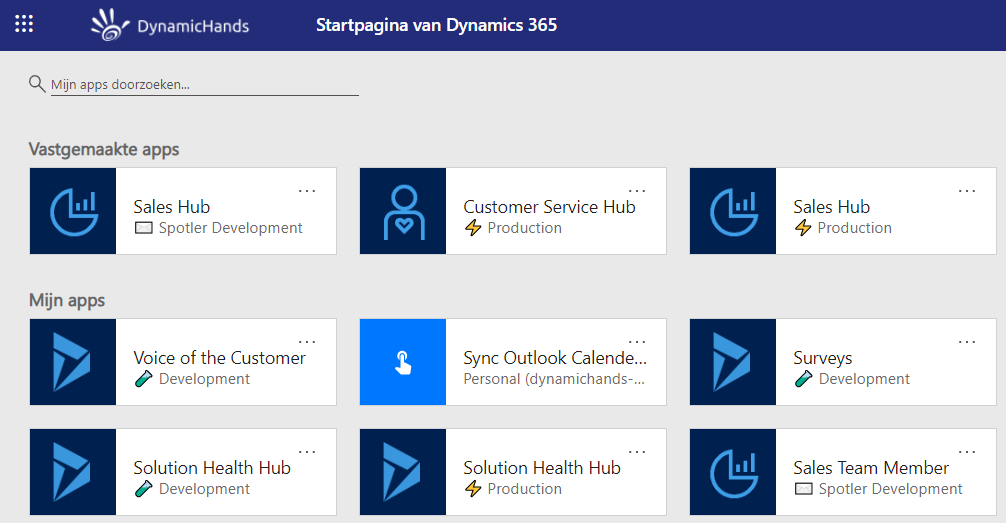
# Environments must be named by purpose *
Name environments only be there purpose, like Production or Test.
❌ DO NOT use abbrevations or contractions, because most users are not aware of the meaning.
❌ DO NOT use the customer name in the environment name, because this is already clear by the tenant where the environment lives in (DRY principle).
TIP
You can even use emoji's to make it even more clear for users!
This will result into the following examples:
❌ DO NOT:
- Contoso Production
- Contose PRD
- PRD
- TST
✔️ DO:
- Production
- Test
- ⚡ Production
- 📦 Acceptance
- 🚦 Test
- 🧪 Development
- 👨💼 Personal
- 📊 Load Test
This will result into a clear homescreen for the users.
# Don't use new_ as prefix *
The prefix is determined by the publisher. Check if there is already a good custom publisher available and use that one. If not, create a new publisher with a good prefix like for example the customer abbrivation.
# Don't use Id in the name of a lookup field *
This Id always bugged me, because of this simple fact - it's not an Id in code, it's a reference. So if you just wanted the Id in code you use this:
var contactId = ((EntityReference)customMethod["dh_ContactId"]).Id;
Which I don't like, because you're repeating the abbreviation Id. In my opinion this kind of violates "DRY" so I will avoid it if at all possible. Using the new school way it looks cleaner without this repetition:
var contactId = ((EntityReference)customMethod["dh_Contact"]).Id;
# One-To-Many relationships should have clear names ⁺
One-to-Many aka Lookups relationship should have the following name, where any prefix is removed apart from the first one:
<prefix>_<primary entity schema name without prefix>_<related entity schema name without prefix>_<fieldname>
This will look like:
| relationship name | lookup field name |
|---|---|
| dh_account_project_customer | dh_customer |
| dh_account_project_endcustomer | dh_endcustomer |
# Many-To-Many relationships should have clear names
Many-to-Many relationships should have the following name, where any prefix is removed apart from the first one:
<prefix>_<entity schema name without prefix>_<entity schema name without prefix> or
<prefix>_<role of the relationship>
This will look like:
| relationship name | relationship entity name |
|---|---|
| dh_account_lead | dh_account_lead |
| dh_teammembership | dh_teammembership |
Important considerations whether or not to use a N:N relationship:
- N:N relationship entities do not support adding additional attributes to the entity. For example, if you want to have an attribute classifying the type of relationship between the two entities.
- The N:N "Add Existing Record" lookup button does not use the CRM lookup view—it limits the visible records to 100, you cannot add additional view columns, and it only supports searching by the name of the record. This is problematic in the case where, for example, there are multiple locations of the same account, each with the same account name.
- The N:N entity that is created does not support workflow. That means that you cannot fire workflows when a new relationship is created, you also cannot use workflow to create relationships.